Showing posts with label math. Show all posts

Tuesday, April 20, 2021

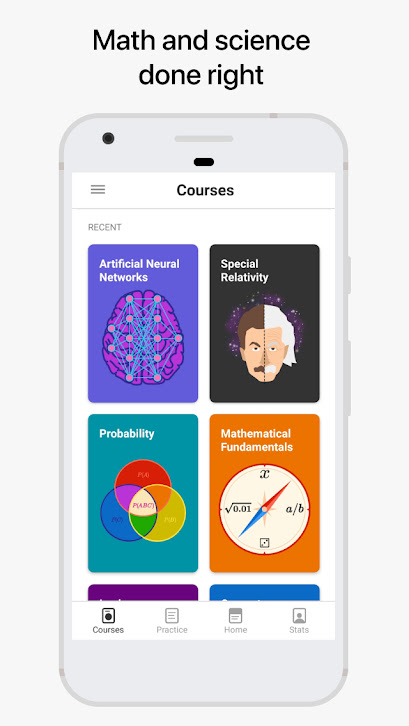
Education : Brilliant app, math and science : Learn think !


“The mind is not a vessel to be filled, but a fire to be kindled.”

Plutarch

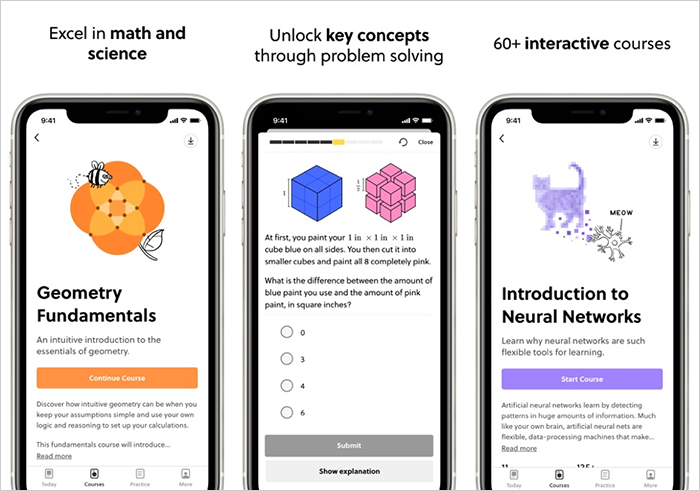
Brilliant app is for anyone who has an interest in mathematics and science. The app replaces lecture videos with hands-on, interactive lessons. It’s a better (and more fun) way to learn.

Dive into advanced, creative problem solving and improve domain knowledge and critical thinking skills. Learn how different domains, like number theory and computer science, are interconnected. Discover how core math and science concepts apply to modern topics.

Brilliant's entertaining and educational course library is great for beginners, and also includes intermediate and advanced topics for teachers and lifelong learners. 

Creators:

Brilliant is made with the loving efforts of lifelong learners from MIT, Caltech, Duke, the University of Chicago, and more.

"We’re passionately working on delivering the very best math and science education on earth. Your age, country, and gender don't determine what you are capable of learning. You do."


https://brilliant.org/


Principles:

Brilliant creates a culture of learning around inquiry, curiosity, and openness to failure. All of our courses are written with these principles of learning in mind.

Effective learning math & science:

  • Excites

The greatest challenges to education are disinterest and apathy.

  • Cultivate curiosity

Questions and storytelling that cultivate natural curiosity are better than the threat of a test.

  • Is active

Effective learning is active, not passive. Watching a video is not enough.

  • Is applicable

Use it or lose it: it is essential to apply what you're learning as you learn it.

Learn more here


screenshot: Brilliant app (tablet)


screenshot: Brilliant app (smartphone)

https://play.google.com/store/


. Learn to think


Whether you want to hone your quantitative skills, improve your knowledge of science and technology, be a smarter parent for your inquisitive kid, or simply stay sharp, Brilliant helps you grow as a curious and ambitious person.


2. Become a better problem solver


Brilliant's approach to learning is active, not passive. Through active problem solving, Brilliant helps you build your quantitative intuition. Learn frameworks for thinking and solving challenging problems, instead of memorizing formulas.


3. Enjoy new challenges every week ... and now every day


With free, curated weekly problems, you can gain timeless knowledge and flex applied problem solving skills in bite-sized sessions. Stay fresh and discuss your favorite solutions with an engaged community of lifelong learners.


screenshots Apps
via Google Play & iOS

Master concepts by solving fun, challenging problems. Brilliant app helps students learn real math and science through conceptual quizzes that are both entertaining and educational.

With free Problems of the Week, students can solve and discuss fascinating problems with members around the world. If you enjoy these problems, then it’s time to subscribe. Once you do, you’ll have access to courses with hundreds of guided exercises on everything from logical reasoning to artificial neural networks.



credits: Unknown
via Google Images


Method:

In school, students are often trained to apply formulas to rote problems. But this traditional approach prevents deeper understanding of concepts, reduces independent critical thinking, and cultivates few useful skills.


The capacity to think critically separates the great from the good. We can grow this capacity by trying — and often failing — to solve diverse, concrete problems.

  1. Start with simple questions and stories that build your foundation and intuition.
  2. Ramp up to solving problems that seemed beyond your ability.
  3. Study different ways of solving the problems that are out of your grasp.


credits: Getty Images/peshkov

For ages 10 t0 110

Get started as a beginner with the fundamentals, or dive right into intermediate and advanced courses for professionals. Brilliant has courses for ambitious students and people of all ages.

Master essential skills

Build confidence with hands-on learning. You'll get to see concepts visually, interact with key ideas, and solve challenging problems that get you to really think.

Stress less, learn better

Enjoy fun storytelling, guided problem solving, and making lots of mistakes while playing. On Brilliant, your natural curiosity will drive you, not the threat of a test.



credits: unknown
via Google Images

Education:

Brilliant app is an educational platform, designed to help make learning fun and accessible. Designed around focused lessons and relatable situations, Brilliant allows students to explore complex science, technology, and math topics in ways that make learning exciting.

With the Brilliant app, there’s no punishment for getting the answer wrong. Instead, a wrong answer is an opportunity to learn.

Whether students guess the correct answer, or are 100% wrong, they can see student-submitted explanations of how the correct answer can be found. Other students can then vote on the explanations, ensuring that the best and most understandable are provided.


  • Brilliant app is free
To unlock the full experience, you need to sign up for a subscription plan. That’s $24.99 for the monthly plan and $119.99 for the annual plan.

  • Available: 

 iOS App Store

  Play Store

Language: English


screenshot iOS Apple Store

Expanding on their learning platform, Brilliant recently introduced their Daily Problems feature. These give students an opportunity to flex their mental muscles and learn new things every day.

The Daily Problems come in a variety of subjects, from algebra, chemistry and computer science.


Today 20 April 2021
Triumphant balance

Each Daily Problem provides an “insight” lesson that gives enough detail to get you on the right path, and the questions are typically presented with a multiple choice answer.

Each topic is divided into various levels with 1 being the most fundamental. The problems offer a path of learning that encourages critical thinking.


credits: Unknown
via Google Images

Remember:

Some of questions are easy to solve, while some take hours. Students don't have to worry about getting an answer wrong. They can always check

Brilliant is a great way to learn and have fun. Its approachable, and allows you to learn a little (or a lot) whenever you want.

Some of the questions are easy to solve, while some take hours. You don’t have to worry about getting an answer wrong. You can always check answers from user submissions to figure out the solutions to such problems. And you can vote on explanations that impressed you.

Get new ideas :

Facebook : Brilliant Math

Facebook : Brilliant Science


Brilliant is a great way to learn and have fun. Its approachable, and allows students to learn a little (or a lot) whenever they want.


G-Souto

20.04.2021

Copyright © 2021G-Souto'sBlog, gsouto-digitalteacher.blogspot.com®

Apps in Education : Brilliant app, math and science : Learn to think ! G-Souto is licensed under a Creative Commons Attribution-NonCommercial-NoDerivatives 4.0 International License.


Sources: Brilliant/ GooglePlay/ iOS Apple


Saturday, December 5, 2020

Schools : Weather vs. Climate : What's the difference ? A new classroom resource by ESA


Weather vs. Climate
credits: ESA

New classroom resource What's the difference between climate and weather? In his new set of activities, students will learn the difference.

How? By analysing statements, collecting temperature data & writing a climate report for the year 2050. Wow! Exciting!

Learn more about the concepts of weather and climate and the role of space in studying changes to our planet in real-time and in the future in the video below:

Meet The Experts with Andrew Shepherd of the University of Leeds, a leading climate scientist working with ESA and NASA.


Weather or climate?


The concepts of weather and climate are often thought to be the same thing.

In this set of activities, students will learn the difference between weather and climate by:

  • Analysing different statements,

  • Collecting and analysing their own air temperature data,

  • In the end, pupils will write a short climate report for the year 2050


credits: Dmytro Lastovych / iStock / Getty Images Plus

Pupils will learn about data collection, different weather and climate scenarios, and their significance to the Earth.


credits: NASA

Learning objectives:


  • Understand the difference between weather and climate;

  • Identify the elements and factors of climate (wind, temperature, atmospheric pressure, rainfall);

  • Identify the world climatic zones by detecting some basic characteristics;

  •  Compare weather and climate data;

  •  Learn how to take and collect weather measurements; 

  • Calculate the average weekly/monthly air temperature;

  •  Interpret tables and graphs, and drawing conclusions.


Subjects: Mathematics,  Science


  • Age range: 8 – 12 years old


  • Keywords: Mathematics,  Science, Climate, Climate  Scenarios,  Weather,  Weather  Elements


Teachers: Resources


Download: Teacher’s guide and student worksheets


Education

Learning the difference between weather and climate can be tricky at first. One of the key differences has to do with time. Weather involves air conditions that occur over a short time, while climate involves the average patterns of weather over a long period of time.

With this resources by ESA, students will be prepared to know the difference studying science and math. 


Weather or Climate?

Activity: game

Want to know whether to take along your umbrella? Consult the weather. But then, what is climate for? Go to activity and play the game


So, there you are! Now your students will know the difference. Hoping their short climate report for the year will be right. Who knows?


G-Souto

05.12.2020

Copyright © 2020G-Souto'sBlog, gsouto-digitalteacher.blogspot.com®


Schools : Weather vs. Climate : What's the difference ? A new classroom resource by ESA bG-Souto is licensed under a Creative Commons Attribution-NonCommercial-NoDerivatives 4.0 International License.

Sources: ESA/ Education

Scholastic/ game


Monday, November 2, 2020

Apps in Education : Google Lens : the app to help students with math & science homework : Let's see !


screenshot Google Lens app
via Google Education blog

Google announced last August, the release of new updates to its popular app Google Lens. Helping kids with lessons and homework, Google are always thinking on new products and features to help with staying in touch with teachers, and safeguarding kids when they’re online. 

"While all the changes seem useful, the one that really stands out from the crowd is the update to Google Lens. It was already a useful tool, but Google is adding a new feature that will allow it to help with solving difficult math and science questions."

With this new homework feature, not only does it function as a cool way to find information, but it could be a game-changer for kids who struggle with difficult math problems.


screenshot Google Lens app
via Google Education blog

Now, new updates to its popular app Google LensStudents will now be able to use the app's homework help to get assistance with math and science. The way the new feature works is simple and easy. 


app Google Lens

via Pocket lint

  • New features:


These features help improve comprehension and understanding of core topics

Visualizing STEM concepts can be hard without labs or hands-on learning tools

Now, students can see 3D content on Search for nearly 100 STEM concepts across biology, chemistry and more using compatible Android and iOS devices. If students search for “Quantum mechanical model,” they can view a 3D atom up close and use augmented reality (AR) to bring it into their space. Check out how to use 3D for STEM concepts. 

Google Lens homework help is here and it's a game-changer when students want to solve math and science problems.


screenshot Google Lens app
via Make Use Of

  • How to help kids with homework and learning from home: 

The feature is incredibly easy to use. To start with, you need to tap the graduation cap within Google Lens. From there, it'll prompt you to take a photo of the problem you need help with. Google Lens will highlight all of the equations or questions it sees, and you tap the one you're stuck on. Next, you'll have the option to copy the text, send it to your computer via Chrome, or edit the math equation.

It's not just a tool that provides students with the answer, either (though it does give you the answer in the end). Instead, Google Lens and Socratic will provide step-by-step instructions to solve the problem. 

It'll also show helpful explainers that will help the student actually learn to solve the math or science equation. After all, the point isn't just to find out the answer, but to understand how to reach it yourself.


screenshot Google Lens app
via Google Education blog


Students open Lens app, take a photo of the science or math problem and Lens will automatically provide step-by-step guidance to help them solve the problem and understand its explanation. Homework help is made possible through a partnership between Socratic and Google Lens


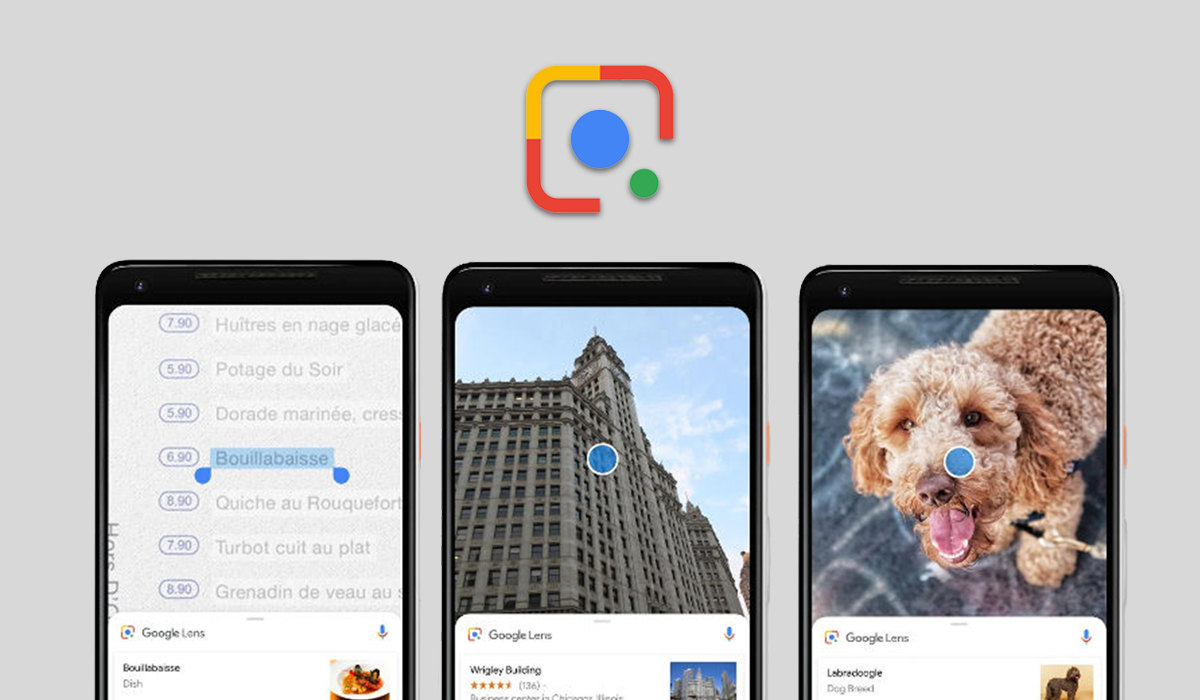
For those of you not familiar with Google Lens, this is an excellent app that allows you to use the camera of your phone to digitize the world around you. You can use it to:

  • Identify plants and animals: Find out what that plant is in your friend's apartment, or what kind of dog you saw in the park.
  • Explore places around you: Identify and learn about landmarks, restaurants, and storefronts. See ratings, hours of operation, historical facts, and more.
  • Find the look you like: See an outfit that catches your eye? Or a chair that's perfect for your living room? Find similar clothes, furniture, and home decor to the one you like.
  • Know what to order: See popular dishes on a restaurant menu based on reviews from Google Maps.
  • Scan codes:Quickly scan QR codes and barcodes.*


Google Lens app

https://lens.google.com/

The feature is incredibly easy to use. To start with, students need to tap the graduation cap within Google Lens. From there, it'll prompt you to take a photo of the problem they need help with. Google Lens will highlight all of the equations or questions it sees, and they tap the one you're stuck on. Next, they will have the option to copy the text, send it to their computer via Chrome, or edit the math equation.

Students can use this to learn how to solve the problem and ultimately find the answer to the question. This same method applies to both math and science questions, though the type of results will vary.


G-Souto

02.11.2020

Copyright © 2020G-Souto'sBlog, gsouto-digitalteacher.blogspot.com®

Apps in Education . Google Lens : the app to help students with math & science homework : Let's see !bG-Souto is licensed under a Creative Commons Attribution-NonCommercial-NoDerivatives 4.0 International License.

References:

Google blog/ Education

MakeUseOf

Sunday, May 1, 2016

April rundown of the most read posts & Claude Shannon !


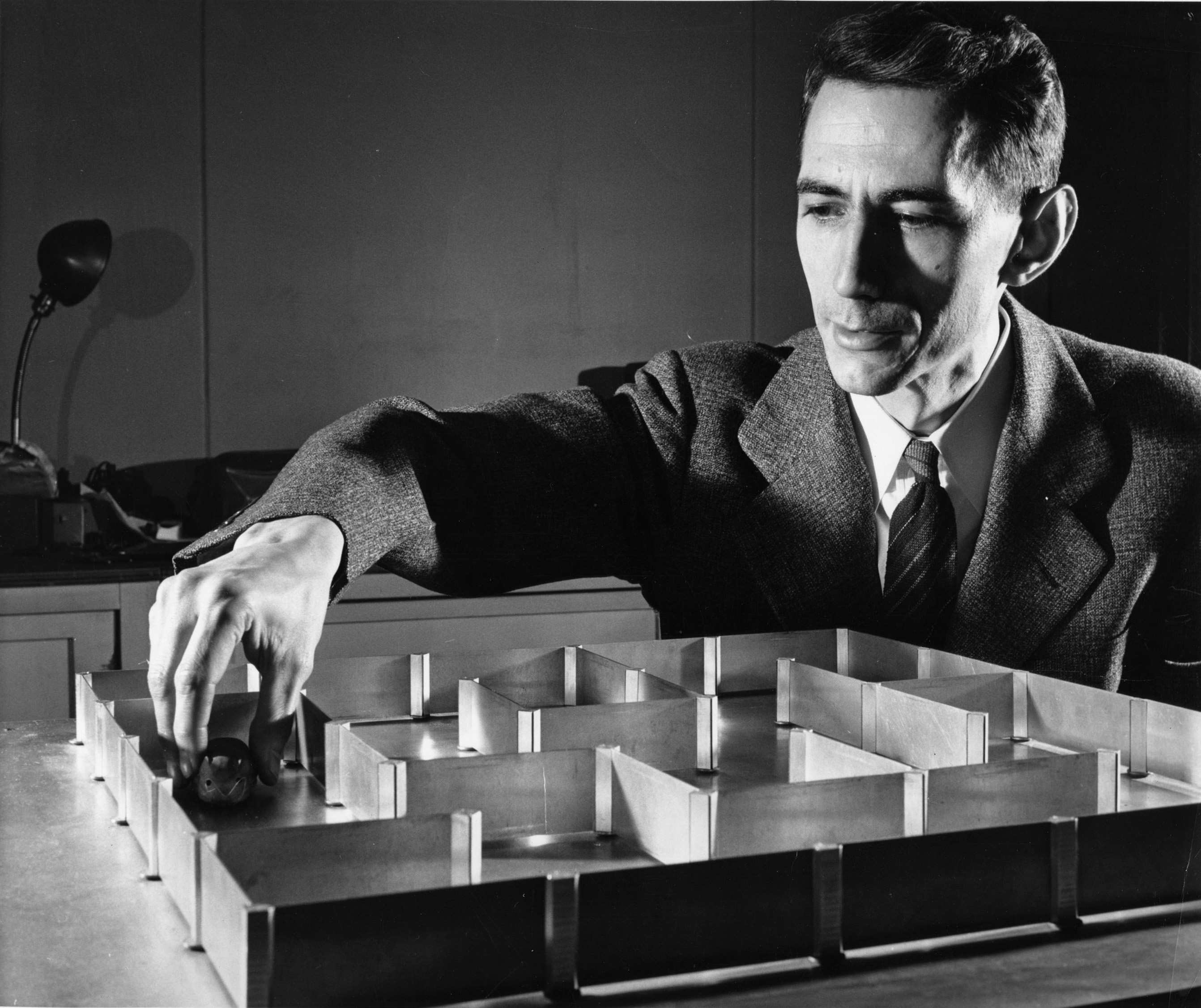
Claude Shannon
Alfred Eisenstaedt / The Life Picture Collection / Getty

How a hundred years after his birth, Claude Shannon’s fingerprints are on every electronic device we own. Shannon was a Member in the School of Mathematics from 1940–41?

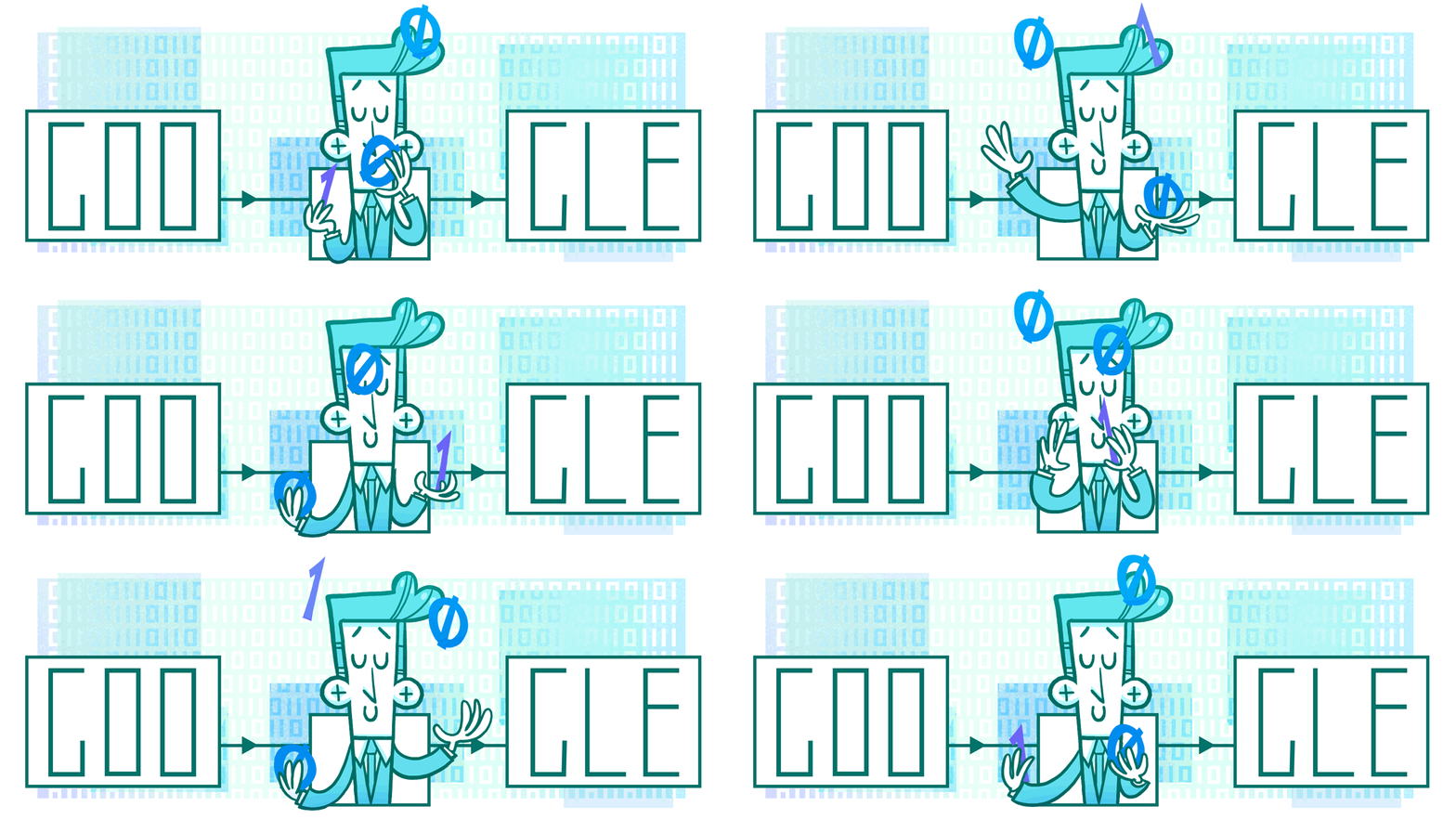
Google Doodle:


Claude Shannon's 100th Birthday
doodler: the artist Nate Swinehart


Last Saturday, 30 April, Google celebrated the 100th Anniversary of Claude Shannon with an interactive Doodle. The creative Doodle by Nate Swinehart celebrated the brilliance and lightheartedness of the father of modern digital communication.


In its time the Google Doodle has celebrated mathematicians such as, George Boole and Hertha Marks Ayrton - as well codebreaker Alan Turing, the 100th anniversary of whose birth was 23 June 2012.
Now it is the turn of Claude Shannon, who worked with Turing on Allied code breaking during the Second World War - not at Bletchley Park, but in Washington, where Turing had been seconded in 1943 to bring the US up to speed with British crypt analytic developments. 


Claude Shannon
credits: Getty

Claude Elwood Shannon is often described as the father of the information age who created the term "bit", short for binary digits. 

It'impossible to overstate the legacy of Claude Shannon. The paper he wrote for his master’s thesis is the foundation of electronic digital computing.  


Claude Shannon
Alfred Eisenstaedt / The Life Picture Collection / Getty

His most famous work is A Mathematical Theory of Communication (1949) in which Shannon introduced information theory, the branch of mathematics focused on transmitting digital data. 

It was in this masterpiece that he coined the term "bit", the fundamental unit of information which relates to digital certainty: true or false, on or off, yes or no.


Education:
Include this Doodle into your sciences and math curriculum at school and let your students discover the incredible sicentific work of Claude Elwood Shannon's research work as possible.
Discuss with your students the importance of this mathematician to modern digital communication.
I couldn't miss this Doodle (my usual readers know I am a fan of Doodles, a awesome resource to introduce any theme in the classroom) as the introduction of the rundown of the most read posts in April.

Here are the most popular posts of the last month:

Schools: Intl Children's Book Day 2016 

Schools: It's Earth Day 2016 : apps & games 

Education: World Book and Copyright Day 2016

Schools, participate ! Girls in ICT Fay 2016 

Éducation: Tout en haut du monde : film animation 

Schools: It's Intl Dance Day? Let's Dance! 

Escolas : Voltemos ao 150º aniversário de Alice 


Hope you enjoyed the different themes and resources published on April on my blog It was a fantastic month full of good themes - books, ICT, arts, environment, animated movies - different pedagogical resources to motivate some of your lessons.

I'm back to posting the normal roundup every week. 

G-Souto 


01.05.2016
Copyright © 2016G-Souto'sBlog, gsouto-digitalteacher.blogspot.com®

Creative Commons License
April rundown of the most read posts bG-Souto is licensed under a Creative Commons Attribution-NonCommercial-NoDerivatives 4.0 International License.